After the December 2025 Google Core Update This Is What to Fix First

If you rely on Google for leads, a google core update can feel personal. Traffic dips. Calls slow down. Suddenly you are wondering what you broke. That stress is real.
However, core updates are not a penalty. They are a recalibration. Google is trying to rank the pages that best satisfy the search. The good news is you can respond without panic.
This post gives you a calm plan. You will confirm impact fast, then fix the highest leverage issues first.
What The December 2025 Google Core Update Means

The December 2025 core update finished rolling out on December 29, 2025 after starting on December 11, 2025. That time window matters because your data will look messy during the rollout.
Here is what it means:
- Google adjusted how it evaluates quality and usefulness across many topics
- Rankings can rise or fall even if you did nothing “wrong”
- The biggest swings often come from relevance and search intent match
- Site wide patterns matter, not just one page
- Improvements usually come from better content and clearer trust signals, not tricks
- Volatility is normal during rollout, so you must compare the right dates
How Do I Know If I Was Hit
Start with Google Search Console. It shows what changed in impressions, clicks, and average position. Also, it helps you separate real impact from short term ranking volatility.
For local businesses, it’s also important to look beyond rankings and evaluate calls, form fills, and map visibility, which are core signals in effective Local SEO.
The timing rule that saves you from bad decisions
Wait at least one full week after the update completes before you analyze. For the December 2025 rollout, that means your clean analysis window starts around early January 2026.
Search Console Impact Checklist

Use this checklist and you will get clarity in under 30 minutes.
-
Step 1 Compare the right date ranges
- Set your “After” range to a full 7 days after completion
- Set your “Before” range to a similar 7 day period before December 11
- Keep the days of the week consistent if you can
-
Step 2 Start with queries
- Open Performance
- Sort by biggest click drop
- Look for patterns like “near me,” “pricing,” “best,” or “how to”
-
Step 3 Then check pages
- Switch to the Pages tab
- Identify your top losers and top winners
- Notice if drops cluster on one content type like blogs or service pages
-
Step 4 Validate with conversions
- Traffic is not the only KPI
- Check calls, form fills, booked consults, and lead quality
- A small traffic drop can still mean better leads
-
Step 5 Rule out technical noise
- Confirm the pages still index
- Check for accidental noindex tags, redirects, or broken templates
- Review Core Web Vitals and mobile usability for obvious issues
If your losses concentrate around a few intents or page types, you have a fixable problem. If everything dropped evenly, focus on site wide quality signals and clarity.
What NOT To Do After A Core Update
Avoid these panic moves because they usually make recovery slower:
- Do not delete half your site in one weekend
- Do not change URLs site wide unless something is truly broken
- Do not rewrite every page at once without a plan
- Do not stuff keywords to “tell Google what the page is about”
- Do not buy links or push shortcuts to force a rebound
- Do not judge results on two days of data during rollout
Instead, diagnose first. Then improve with a prioritized checklist.
What Should I Fix First
If you run a small business, you already know how hard it is to get found online when customers search locally. You might feel invisible in the search results even when you offer great service. You may see competitors outrank you even when they are farther away or less qualified. You may notice that your website shows up for some terms but disappears for the searches that matter most.
Local SEO exists to fix that. And when you understand how local search works, you can solve issues that hurt your visibility. This guide breaks everything down in simple, practical steps so you can strengthen your presence and help customers find you faster.
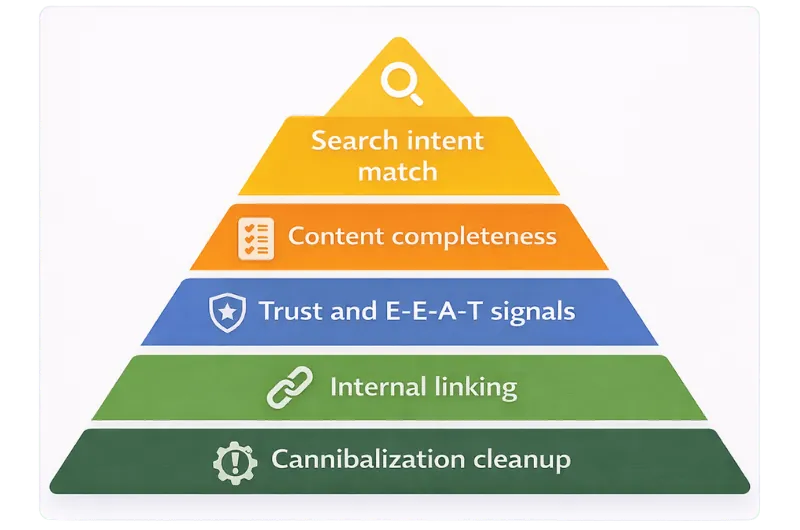
You want the highest impact work first. This is the order we use when rankings shift after a google core update.
Fix #1 Match the search intent better than everyone else
Why it matters
Core updates reward pages that fully satisfy the query. If your page targets “roof replacement cost,” but it reads like a brochure, users bounce.
How to do it
- Identify the exact query you want each page to win
- Study the current top results and note the format
- Align your page to that format while improving clarity and depth
Quick win
Rewrite your intro so it answers the query in the first 2–3 sentences.
Deeper fix
Add the missing sections users expect, like pricing factors, timelines, FAQs, and next steps.
If aligning intent across multiple pages feels overwhelming, this is exactly where a structured SEO strategy makes the biggest difference.
Fix #2 Refresh thin pages into complete answers
Why it matters
Thin content rarely survives a core update. It feels incomplete. It also signals low topical authority.
How to do it
- Combine overlapping articles that compete with each other
- Expand short pages with examples, steps, and real world context
- Remove filler and add the details that drive decisions
Quick win
Add a TL;DR plus a short checklist near the top.
Deeper fix
Build a hub and spoke structure. Create one strong “core update recovery” hub, then link supporting pages into it.
Fix #3 Strengthen E E A T signals without sounding salesy
Why it matters
Trust matters more when users make real decisions. Even non YMYL niches benefit from visible credibility.
How to do it
- Add author and editor info where it helps
- Include real experience like process photos, screenshots, or outcomes
- Cite credible sources for facts and timelines
- Add “last updated” dates for time sensitive content
Quick win
Add a short “How we know” section with your experience and process.
Deeper fix
Create a consistent trust block across key pages with credentials, location, contact, and review signals.
Fix #4 Improve internal linking so Google understands your priorities
Why it matters
Internal linking helps pages share authority. It also guides both users and crawlers to the next best step.
How to do it
- Link from high traffic pages to your most important service pages
- Add “related” links that actually match intent
- Use clear anchor text that describes the destination
Quick win
Add 3–5 internal links from your top blog posts to your core service pages.
Deeper fix
Map topic clusters and make sure every cluster has a hub page.
Fix #5 Clean up cannibalization and confusing page overlap
Why it matters
When multiple pages target the same query, Google has to guess which one to rank. That often leads to unstable performance.
How to do it
- Find pages with the same target keyword
- Decide which page should be the primary
- Merge, redirect, or re angle the extras
Quick win
Update titles and headings so each page targets a distinct intent.
Deeper fix
Consolidate similar pages into one stronger page with sections and jump links.
A 7 Day Quick Recovery Plan
Use this when you need a clean, confident response fast.
- Day 1 Confirm impact
Compare before and after ranges in Search Console. Document winners and losers. - Day 2 Identify intent gaps
For your top 5 losing queries, note what the top results include that you do not. - Day 3 Update your top 3 losing pages
Improve intros, add missing sections, and tighten headings. - Day 4 Fix internal linking
Add links from winners to losers, especially from high traffic blogs to service pages. - Day 5 Reduce thin content
Expand or merge the weakest pages that target your main services. - Day 6 Improve trust signals
Add author info, proof points, and clearer business details where appropriate. - Day 7 Recheck and set alerts
Save the report, set a weekly check, and watch impressions trend, not daily swings.
A 30 Day Improvement Plan
This is how you turn a core update into long term growth.
Week 1 Build your recovery dashboard
- Create a simple tracker for top queries and top pages
- Add conversions and lead quality metrics
- Tag pages by type like service, location, blog, and guide
Week 2 Rebuild your top content around search intent
- Refresh the top 5 pages that drive revenue
- Add FAQs, examples, and clearer next steps
- Improve on page structure for easy scanning
Week 3 Expand topical authority
- Create one hub page per core service or topic
- Publish 2–4 supporting articles that answer real questions
- Link every supporting post back to the hub
Week 4 Tighten technical basics and polish trust
- Check indexing and template issues
- Improve page speed basics where it is obviously slow
- Strengthen internal linking and credibility signals across key pages
If you do these four weeks well, you will feel more stable. You also build momentum for the next update.
Turn The Update Into An Advantage
A google core update can feel like the ground moved. Still, you are not powerless. Start by confirming impact with the right dates. Next, fix the highest leverage issues first, and build a modern SEO strategy built for search and AI discovery to create long-term stability beyond any single update.
Intent match, completeness, trust signals, and internal linking create stability.
If you want a second set of eyes, JDS 1 Marketing can help. Bring your Search Console data, and we will map a clear action plan for the pages that matter most. Book a free consult and coffee is on us.
FAQ
How long does a Google core update take to roll out
Most rollouts take days to a few weeks. The December 2025 rollout ran from December 11 to December 29.
How do I know if the core update hurt my site
Check Search Console and compare a full week after rollout ends to a similar week before rollout begins. Look for query and page patterns.
Should I change my whole website after a core update
No. Start with your top losing queries and pages. Fix intent match, thin content, and internal linking first.
What is the fastest thing to fix after the December 2025 update
Update the pages that lost the most clicks. Improve the intro, answer the query fully, and add helpful sections users expect.
Can I recover without building new links
Often yes. Many recoveries come from content refresh, better structure, clearer relevance, and stronger trust signals.
Does AI search change what I should do
It changes the format more than the fundamentals. Clear structure, direct answers, and credible proof help both Google and AI summaries.
Keep reading
SEO Strategy Guide for Modern Search and AI Discovery
Rankings don’t pay bills. Leads do. Traffic looks good in a report. Rankings feel like progress. But neither guarantees revenue. A real SEO strategy connects visibility to qualified leads and…
Using AI for SEO Without Sounding Like Everyone Else
AI can scale your content, but without a clear strategy, it can also dilute your brand. What starts as growth can quickly turn into inconsistent messaging, weak voice, and content that sounds like…